This example threat model illustrates how to use the ReSpec
Threats rendering library.
Status of this Document
This is an example use of the threat modeling library in a
simple ReSpec document. It is not intended for use as an actual
threat model.
Introduction
Threat modeling is a vital part of specification development.
This example builds on the Minimalist Threat Model for the Web as
specified in the
W3C Threat
Modeling Guide.
Description
The World Wide Web ("the Web") is built on many different
technologies,
many of which are independently developed and maintained. This makes
threat
modeling for the Web a complex challenge (See The
Web is
Unversioned).
For this threat model, we think about the World Wide Web as
just nine independent components: three human (user, website
admin, and network operator), three in software (a browser, a
DNS server, and a web server), and three legal persons
(Website Application Providers, Internet Service Providers,
and Public Sector Officials). This is an intentionally
simplified view of the web so that we can focus on the threats
inherent in a minimal instantiation of an TLS-secured World
Wide Web as an illustration of how to threat model. It is our
hope that this work catalyzes a broader, more extensive threat
modeling effort that eventually can be used in earnest to
improve the security of the web.
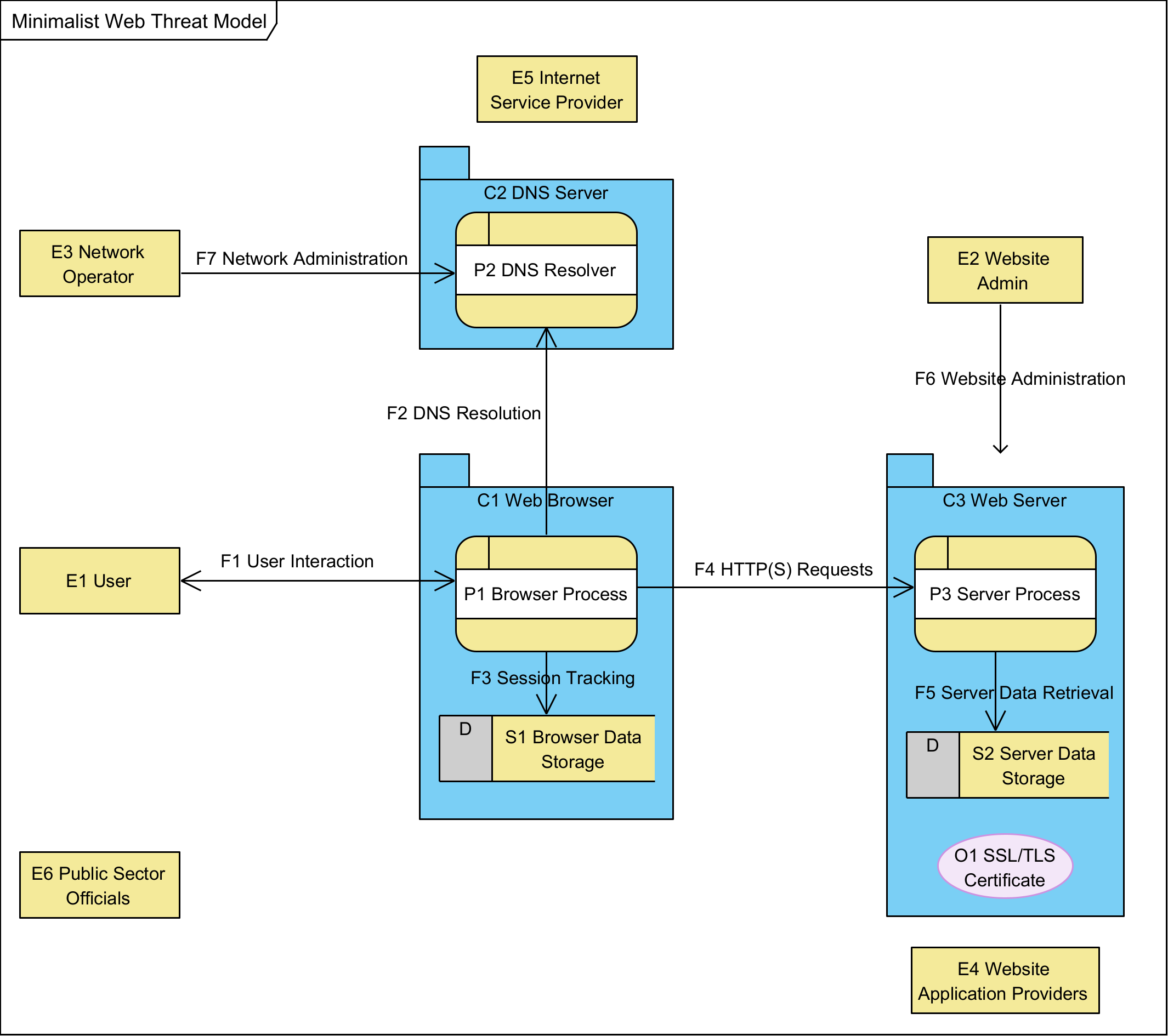
Data Flow Diagram for Minimalist Web Threat Model
Data Flow Diagram for Minimalist Web Threat Model
Data Flow Description
For this diagram, consider the simplest realization of the
world wide web including DNS and TLS.
In the intended use, a user (E1)
interacts (F1) with a browser process
(P1), which operates in its own container, the
web browser (C1). This interaction
directs the browser to display a specific URL as selected by the
user. The browser process (P1) starts by resolving the
domain name of that URL by requesting DNS
resolution (F2) from a DNS
resolver (P2), which returns an IP address for
HTTPS requests to that domain. This information is tracked as
session data (F3) and stored in
browser data storage (S1). Then, the
browser sends HTTPS requests (F4) to a
server process (P3), which is running in
its own container, the web server (C3).
These requests (F4) are encrypted using TLS protocols. In
response to requests (F4), the web server returns a TLS
certificate (O1) and the resource requested, using its
own server data storage (S2) to generate an appropriate response.
Supporting this operation are the Website Administrator
(E2) and the (E3) Network Administrator, who keep
the network-available services running.
Additional stakeholders include the legal entities running
websites (E4 Website Application Providers) as well as
those legal persons running Internet infrastructure
(E5Internet Service Providers). Finally, public servants
of various kinds have both legitimate interests in making sure
everything is running according to the law and public policy
(E6 Public Sector Officials).
note:We
do NOT model potential attackers, as over-characterizing
attackers can lead to analysis bias that is better avoided.
It is understood that the browser process (P1) is
likely realized as multiple processes running as software in an
operating system on a device. Threat modeling for such details
would suggest breaking both the process and its container
(C1) into its subcontainers and processes, identifying
the flows between each. However, in this threat model, we treat
the web browser as just two elements, the browser process and
its data storage.
Similarly, the web server (C3) is often realized not
only as multiple processes, but often with data flows that
communicate with multiple back-end systems in response to user
requests. However, it is possible to realize the web server as a
single process in a single container with its own local storage,
which contains its TLS certificate. For our analysis, we choose
this minimalist realization.
The DNS resolver also depends on external data flows that are
beyond the scope of this threat model.
We treat the DNS Server and the Web Server as essentially
black box elements which provide information in response to
requests, but whose internals are intentionally outside the
threat model. We are not evaluating the threats of the DNS
system. Nor are we evaluating the threats of any particular
back-end system or web server. These are external systems which
may be worth noting as sources of threats, but whose definitions
are beyond this scope.
Dictionary
E1 User
The user of the Web. Designed for human users, this role can
also be realized by automated software, including scripts and
AI. However, we consider the user as a black box without
regard to the type of user or the subprocesses and data that
might be used internally. Users control a user-agent, aka a
browser, for interacting with the World Wide Web.
E2
Website Administrator
The administrator of the website. Their goal is to keep the
website running as intended by the website owner. It may be
presumed that they have complete access to everything on the
server and can monitor or manipulate all communications into
and out of the website.
E3
Network Administrator
Any number of network administrators who keep the network
running, including maintaining an operational DNS system. In
practice, this party also has the ability to watch and
manipulate activity on its services.
C1
Web Browser
The collection of processes and data that realize the web
browser for an individual user. Typically running in an
operating system on a device, potentially alongside other
processes, possibly with different threat boundaries. In this
threat model, the browser is simplified to just a single
process and single data store.
C2
DNS Server
The collection of processes and data that perform DNS
resolution. Typically running as a service on a server
somewhere, we treat it and any back-end networking as a black
box that simply turns domain names into IP addresses.
C3
Web Server
The collection of processes, data, and data objects that
perform the server role in browser interactions. Typically
running as a service on a server somewhere, we treat any
sub-process architecture and back-end data flows as a black
box that simply responds correctly to properly formed HTTPS
requests using its own data store (S2) and data object (O1).
P1 Browser
Process
The running algorithm that processes user interaction (F1)
to engage with resources requested (F4) from different web
servers (C3) using its own data storage (S1) to present a
coherent browsing experience.
P2 DNS
Resolver
Returns the IP address for interacting with a provided
domain.
P3 Server
Process
The running process that receives and responds to HTTPS
requests, providing resources for display or use by web
browsers.
F1 User
Interaction
User input and display, for controlling the browser and
viewing the web.
F2 DNS
Resolution
Requests to turn a domain name into an IP address. Response
includes the IP address.
F3 Session
Tracking
Management of current browser sessions to keep track of TLS
meta-data and related information.
F4
HTTPS Requests & Responses
Requests from the browser to the server and their responses.
F5
Server Data Retrieval
Requests from the server process (P3) to server data storage
(S2) for information needed to respond to HTTP requests.
F6
Website Administration
To set up and maintain the website, administrators engage in
a number of activities, with data flows in both directions.
Assume the website administrator has unlimited access to the
website system.
F7
Network Administration
Like Website administrators, network operators engage in a
number of data flows to set up and maintain the network,
including running DNS servers. Assume the network
administrator can see and manipulate anything on the network
unless explicitly secured in some manner.
O1 TLS
Certificate
Digital object that allows systems to verify the identity
& subsequently establish an encrypted network connection
to another system using the Transport Layer Security (TLS)
protocol.
Stakeholders
E1 User
The user of the Web. Designed for human users, this role can
also be realized by automated software, including scripts and
AI. However, we consider the user as a black box without regard
to the type of user or the subprocesses and data that might be
used internally. Users control a user-agent, aka a browser, for
interacting with the World Wide Web.
Users include just about any human on the planet using web
technology to realize their own goals. This includes your
healthy, wealthy consumer with the latest technology as well as
members of vulnerable populations in challenging situations
where accessibility and connecting might be a challenge.
These users' shared goal is reliable access to web-based
services. Those services should operate as intended and the
information they receive through their browser should be as the
website provider intended.
E2 Website Administrator
The administrator of the website. Their goal is to keep the
website running as intended by the website owner. It may be
presumed that they have complete access to everything on the
server and can monitor or manipulate all communications into and
out of the website.
The goal of website administrators is for their website to
deliver authentic services over the network without interference
such that interactions with end-users are faithfully engaged in
both directions, from the browser through the network to the
server and back. They want confidence that the end-user is
experiencing the application that they developed without
interference during communication. Finally, they want the input
from users to be unadulterated and timely.
This includes all parties with authority to affect the
website, including developers and customer support.
E3 Network Administrator
Any number of network administrators who keep the network
running, including maintaining an operational DNS system. In
practice, this party also has the ability to watch and manipulate
activity on its services.
These individuals work for Internet Service Providers and
includes defending the network against any attackers, including
enterprise network operations. They keep the network running. That
denial of service and person-in-the-middle attacks. As the
guardian
of the network, these individuals often need to view data that
could be used maliciously by malicious parties.
The goal of network administrators is visibility and control
over the parts of the network they control, and reliability and
integrity for the parts of the network they don’t.
E4 Website Application Providers
Web application providers fund and maintain websites that
provide services to end-users. These include for-profit
organizations, whose offering necessarily supports their
money-making agenda, as well as mission-driven public-sector and
non-profit organizations for whom the website may serve a social
benefit other than profit generation.
The goal of website application providers is to be reliably
accessible to their constituents and to realize their intended
functional goals, such as selling products or managing
conversations. Focused on just their own applications, these
providers rely on the Web as a medium for interacting with their
customers and stakeholders.
E5 Internet Service Provider
Internet Service Providers (ISPs) deliver infrastructure
services such as connectivity, hosting, and specific network
components such as DNS hosting and registration, email services,
as
well as dynamic DNS and TLS certificates.
These parties need the network to keep running, resilient to
considered "utility" providers whose offerings are best
appreciated
attacks that would disrupt operations. While they are often when
they are most invisible.
The goal of Internet service providers is for users on both ends
of the network (end-users and services) to be able to reach the
other end, as designed and implemented by application providers.
Hosting providers want their clients' websites to stay up and be
accessible in a reliable way; connectivity providers want their
clients to have reliable, uninterrupted, and unfettered access to
the services (or users) they want to reach online.
E6 Public Sector Officials
Public sector officials include law enforcement, elected
officials, and regulators seeking to oversee public interests in
our digital communities.
Unfortunately, the Web doesn’t have specific oversight roles for
public sector officers. The protocols and specifications of the
World Wide Web do not specifically give capabilities to different
parties based on their status or role in society. Nevertheless,
these entities have jobs to do, whether it is enforcing privacy
regulations or investigating a murder.
While too much public oversight can constitute undesirable
surveillance and abuse of power, specification developers and
implementers should consider threats posed both
*by* public sector entities and
*to* public sector interests. For example,
subpoenas and other legal mechanisms can force website providers
to
reveal information otherwise secured by technical means. In some
use cases, this may be important for security and privacy
considerations.
The goal of public sector officials is to ensure that rules and
regulations are being followed in their jurisdiction so that
legitimate services can be securely accessed by appropriate
persons
wherever and whenever that might be. This includes preventing
fraud, illicit sales, and privacy harms.
Threats
Contributing
This threat model is an example and is not actively maintained.
However, the threat rendering library is open for feedback, bug
reports, and proposed changes via issues and pull requests.
To propose a change, create an issue proposing your change.
Adding a threat
To add a new threat to the model, we need several components.
A good name
A unique ID
A description
One or more responses
List of affected elements
The threat taxonomy
The threat class
We discuss each of these below.
A good name
Choose a short, descriptive name that captures the essence
of
the threat. Make sure the name is distinctive within this
threat model.
A unique ID
Every threat should have a unique ID that starts with the
letter 'T' following by an integer number,
e.g., T12
A description
Describe the threat with enough detail for readers to
understand the scope of concern
One or more responses
Each response should describe something either the
specification does or that implenters should consider to
address the threat. Responses also need a good name (short
and
descriptive) and a unique ID (starting with the letter 'R'
followed by an integer number).
It is likely that a single response is appropriate for
multiple unique threats. For example, cryptographic signing
is
a reasonable response to tampering for any number of data
objects. In this case, simply reuse the response name and ID
of the first use and repeat the description text along with
the phrase, in parantheses, '(Reused Response)'
List of affected elements
Drawing from the diagram and dictionary, identify the
components in the diagram affected by this threat. Make sure
the PR includes a link to the affected components, e.g.,
Identify the threat taxonomy used to identify the
threat.
For example, STRIDE, LINDUN, or OSSTMM3 for taxonomy. If none was used,
enter "NONE".
The threat class
Identify the class of threat as defined within the threat taxonomy.
For example, "Spoofing".
Adding to the repo
Create A threat file
Give it a good name
Add javascript element
Add threat to outline
Create a threat file
Create a JavaScript file that defines and registers your
threat, formatted like the following template. Make sure you
retain the opening immediate function execution wrapper and
that you register with the ThreatModel object.
// wrap your data definition in an Immediately Invoked Function Expression
(function () {

  // then define a single threat
  var threat = {
    id: "T0",
    name: "Template Threat",
    description: "This is a template threat. It is not a real threat.",
    responses: [{
      id: "R0",
      name: "Template Response",
      description: "This is a template response. It is not a real response."
    }],
    elements: ["C1", "P1"],
    taxonomyName: "Fake Taxonomy",
    taxonomyClass: "Fake Type"
    tags: ["security"]
    }
  };

  // then register that threat with the global ThreatModel object
  window.ThreatModel.registerThreat(threat);

})();  // Finish the Immediately Invoked Function Expression
Give the file a good name
Name the file uniquely, preferably with the following pattern
based on the ID and name, all in lower-case kebab style
          var id = `${threat.id}-${threat.name}`;
          id = id.toLowerCase();
          id = id.replace(/ /g, "-");
          return id;
For example, T0. Template Threat becomes
t0-template-threat
Add javascript element
Add a new <script> tag
to index.html
alongside the other threat definition files